Learn about Monarch problem types
When students are working in assignments, they might encounter different types of problems. This section introduces the major problem types in Monarch from the student's perspective. It also explains the grading associated to each problem type.
Click the link to learn about the problem type.
Drag
and drop
problems
A drag and drop problem
requires students to click an item -
an image, a word, a phrase, a character - and
drag it to its correct location. Sometimes, the student may drag an item onto
a picture. For example, the student would drag the name of a city onto a map.
Other times, the student might drag an item over a word or phrase to label the
part of speech of a word.
Grading: Typically, one point for each
correctly-dragged item. The total points for a problem may
depend on how many items to drag. It's possible to receive partial
credit on drag and drop problems.
To answer a drag and drop problem:
- Select the item to drag.
Click and hold it with the mouse.
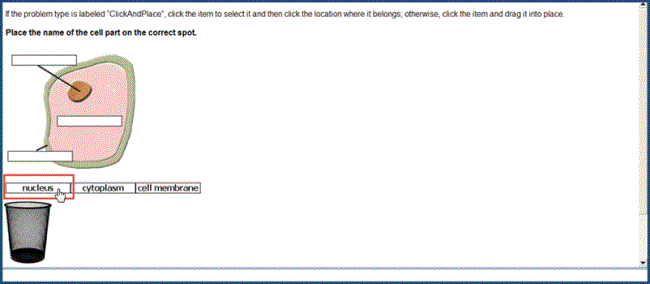
- Still holding the mouse button
down, drag the item to its correct location. When the item is over its correct location,
release the mouse button to “drop” it there.
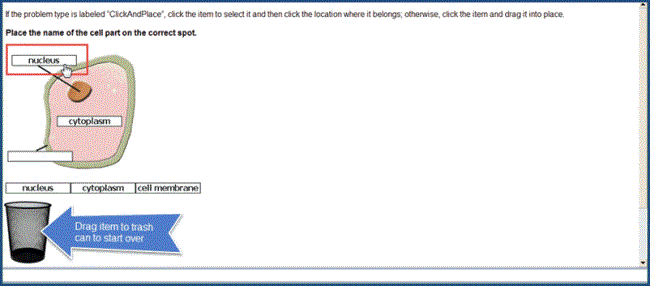
- Repeat this process until all the items have
been placed in their correct locations.
- Click the Submit Answer button to submit for grading.
Note: Be careful not to "stack" one item
over another, or the problem may be graded as incorrect. If
an item is dragged to the wrong place,
double-click it to pick it up and continue dragging it to its correct
location. Also, drag any item to the "trash can" to start over again.
Project and essay problems
Most
essays and projects come with links to open a window where the student enters the
answer. Students should always read the instructions for the assignment before beginning.
Grading: Essays and projects are graded by the Teacher, not Monarch. However, some essay and project problems may have a grade point already assigned by the curriculum author when the problem was written. This means that the Teacher grades the problem, but the student cannot receive a grade percentage higher than the one assigned by the curriculum author.
Fill-in-the-blank problems
Fill-in-the-blank problems are what they sound
like. The student types the answer in the blank box. There is a special kind of fill-in-the-blank
question often used, especially in math problems. This special type has a green text box to type in. The student can tab to the next field that should be completed.
Note: Students need to take care with spelling, capitalization, punctuation, and spacing of the missing word. It must be the exact word or words from the text to get full credit.
Grading: Fill-in-the-blank problems are usually
one point per answer.
To complete a fill-in-the-blank problem:
- Click in the empty box and type the answer.

- If the problem has more than one blank box, TAB to the next empty box and type the answer.
- When finished, click the Submit Answer button to submit for grading.
Layered text boxes problems
Layered
text questions are much like fill-in-the-blank questions.
Students most often see them in math problems, where tabbing to the next text
box is helpful.
Grading: Layered text box problems are typically worth 1 point each.
To answer a layered text box problem:
- Enter
the answer in the green text box and tab to the next green text box.
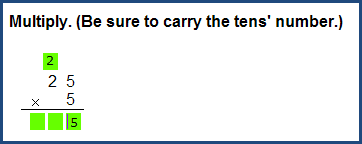
- When finished, click the Submit Answer button to submit for grading.
Listen/Record problems
Listen/Record
problems help students practice their pronunciation in Spanish assignments. Make sure that
speakers and a microphone are plugged into the computer.
Grading: Listen/Record problems are usually worth
1 point each.
To use a listen/record problem:
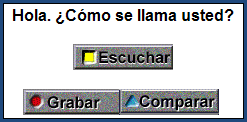
- Click Escuchar to
hear a word or phrase spoken aloud.
- Click GRABAR to record the pronunciation of the word
or phrase.
- Click Compraro to hear what was recorded.
Matching problems
Matching problems have two columns of related information, for example, terms in one column and definitions in the other. Students enter the number of an item in the box next to the corresponding item in the second column.
Grading: Typically, one point for each
correct match.
To answer a matching problem:
- Begin with the item in the left column.
- For the correct corresponding item, enter the number in the box.
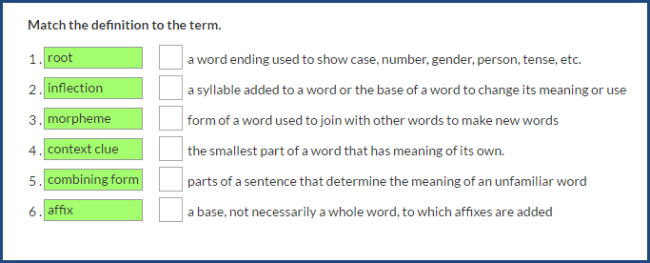
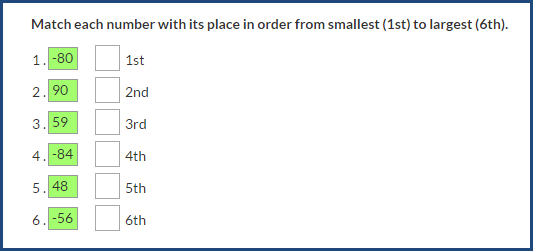
- To change a number, enter a different number in the box.
- When finished, click the Submit Answer button to submit for grading.
Multiple choice problems
Multiple choice
problems ask students to choose only one correct answer between three to five possible answers in a list.
Only one answer can be selected.
Grading: Multiple choice problems are typically
worth one point each.
To answer a multiple choice problem:
- Click the circle button next to the correct answer.
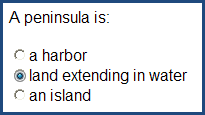
- When finished, click the Submit Answer button to submit for grading.
Multiple select problems
Multiple select
problems ask students to select all the possible correct answers in a list.
Students can select none, some, or all of the answers.
Grading: Multiple select problems are typically
worth one point each. In some cases, if there are multiple correct answers, students may receive one point for each correct answer.
To answer a multiple select problem:
- Click the check boxes next to the correct answers, placing a check mark
in each box.
- To clear an answer, click an existing check mark.
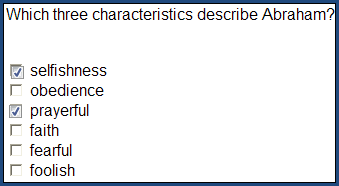
- When finished, click the Submit Answer button to submit for grading.
Paragraph box problems
Paragraph box problems require students to type a response
in a text box. A response might be one or two sentences or even one or two
paragraphs long, depending on what the problem is asking for.
Grading: Although the points
each paragraph box problem is worth may be visible to the student, these problems are teacher-graded
and are not figured into the grade until the Teacher has completed grading.
To answer paragraph box problems:
- Click anywhere in the paragraph box and type the response.
- When finished, click the Submit Answer button to submit to Teacher for grading.
Preloaded problems
In preloaded problems,
students usually see an answer (usually a word, phrase, sentence, or paragraph)
already in a box. Students decide whether or not to keep the answer or change it.
Grading: Preloaded problems are usually one point
per answer.
To answer a preloaded problem:
- If the student thinks the answer is correct, leaves it and clicks
the Submit Answer button.
-
If instructions require the student to change the information, the student types the change
in the box, making sure the answer reads exactly the way he/she wants before
clicking the Submit Answer button.
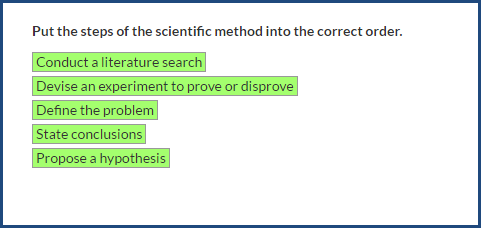
Sorting problems
Sorting problems require students to select items and place them in the correct sort order based on the question. Examples of some typical sorting problems would be: putting
a list of items into alphabetical order, or ranking numbers in order from
largest to smallest.
Grading: Depending
on what a sorting problem asks for, either one point for the
entire problem or one point for each correctly sorted answer. It is possible
to receive partial credit on sorting problems.
To solve a sorting problem:
- Begin with the first item in the series (the
first event to happen, the first word to appear in alphabetical order,
etc.)
- Select the item and hold the mouse and drag the item to its correct position in the order. Release the mouse button.
- Select the next item in the series and continue
dragging and dropping until finished sorting each entry and are satisfied with the
answers.
- To change
any answers, hold and drag the item. Release the mouse button.
- When finished, click the Submit Answer button to submit for grading.
Text multiple choice problems
Text multiple choice
problems look like fill-in-the-blank problems, except students select the correct answer from a list of possible answers.
Grading: The number of points often
depends on how many textboxes or graphics appear in the problem. Typically, one point for each answer.

To answer a text multiple choice problem:
- Click the Choose arrow to see a list of possible answers.
- Click the one answer deemed to be be correct so it is displayed in the box.
- Click the Submit Answer button.
True/False problems
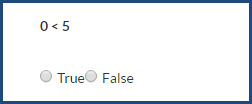
A True/False problem
shows a question with a True option and a False option. Select the correct option, and then click the Submit Answer button.
Grading: True/False problems are one point for a correct answer.
Unordered answer problems
Unordered answer problems ask students to type a series of responses, usually words or phrases. Students receive credit as long as all the correct answers appear in the boxes.
Grading: Unordered answers are normally worth one point per answer.
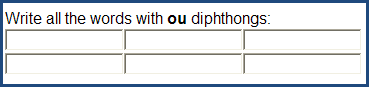
- Type answers into the answer boxes in any order.
- Click the Submit Answer button to submit for grading.
 ©2018 Monarch™ Alpha Omega® Publications, a division of Glynlyon, Inc. All rights reserved.